

Google Maps Now Includes Hearing Loops
Having hearing loss requires us to think about how we will hear everywhere we go. This can be particularly challenging in public settings like places of worship, a meeting room, or even a service counter where hearing aids alone are often not enough. Assistive listening systems like hearing loops can help you hear better in different locations — but when you’re planning your day out and about, how do you know where hearing loops are?
Know before you go
Thanks to a joint effort by HLAA’s Get in the Hearing Loop (GITHL) program and Google, you can now use the Google Maps app to find out before you go if a hearing loop is available at a business or venue. At the request of the HLAA GITHL committee, Google has recently added Assistive Hearing Loop as an accessibility attribute in Google Maps. Having easy access to hearing loop locations will help millions of people with hearing loss find communication access when they venture out. GITHL is helping Google Maps add loop locations to its database, and venues can also update their profiles with this information.
Hearing loop benefits
 Hearing loops are user-friendly assistive listening systems that offer easy, immediate, discreet communication access and universal hearing aid compatibility.
A hearing loop system transmits an audio signal directly into telecoil-enabled hearing devices via a magnetic field, greatly reducing background noise. Most prescription hearing aids and cochlear implants have telecoils, ask your audiologist or hearing instrument specialist about how to use this function.
For people without hearing devices or hearing devices without a telecoil, public venues are required to provide hearing loop receivers and headphones. Watch this video on how hearing loops work.
Google Maps gamechanger
With Google Maps hearing loop information at our fingertips, we can easily find looped locations and plan outings, errands, and activities that are hearing accessible. Without this much needed information, we may have simply stayed home.
The new Google Maps feature is good for businesses and entire communities, too. Venues can easily promote their hearing loops and attract more customers, and more people will learn about hearing loss and communication access in their neighborhoods. And all of this combines to make advocating for hearing loops easier.
Globally, you can find hearing loops in theaters, tourist attractions, senior communities, and places of worship. Hearing loops are also appearing in airports, elevators, grocery stores, libraries, and government offices. By improving audio clarity and comprehension in places where it is often difficult to hear, hearing loops help us stay engaged and active.
“When I experienced hearing loops for the first time — seven years after I started using hearing aids — it completely revolutionized my world of hearing,” said Ibrahim (Ib) Dabo, director of Enterprise Business Systems for Global Ministries, United Methodist Church and HLAA Board member, “The clarity and proximity of speech are something I never imagined. It significantly improved my understanding of speech and increased my confidence to communicate in challenging settings.”
How to access the Google Maps hearing loop accessibility feature
- On a smartphone, open a Google Maps listing, under the photos, scroll to the right to find the “About” tab. Then click on “About” and scroll down to reveal the Accessibility Attribute; it will be listed under details.
- On a computer, open a Google Maps listing and click on the right arrow next to the location description.
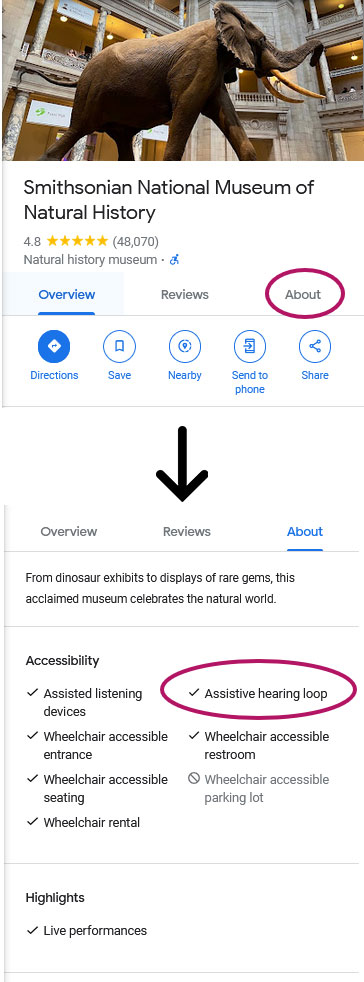
(Click to view larger image)
You can help!
 Help spread the word that hearing loops are now on Google Maps. Tell your friends, family and your local venues: 5 Actions to Promote Hearing Loops on Google Maps
Write a hearing loop review on a venue’s Google Maps listing or use your review to request that a hearing loop be installed. When possible, include a photo of the hearing loop sign.
For more information on hearing loops, how to use them, and how to advocate for them, visit hearingloss.org/GITHL.

By Cheri Perazzoli, Get in the Hearing Loop Program, volunteer committee chair
Enjoyed this post? Never miss out on future posts by following us.
Get the latest news and updates from HLAA
HearingU Webinars
HLAA regularly hosts webinars on a variety of hearing wellness topics. View the upcoming schedule or watch a previous video.
Follow HLAA on our social channels



If you or someone you know has a hearing loss, visit hearingloss.org for resources.
Find a local chapter or Walk4Hearing near you.
For questions, contact HLAA at inquiries@hearingloss.org.